 Antal


 Antal chart assistant
 Patient-scoped tools · Cited records · Answer checks


 Practice-hosted, protected storage
 Citations and answer checks
 Read-only Open Dental access
 Safety rules stay deterministic
 Live-use readiness comes first
AI & clinicalDemo
Ask about one patient's chart, with citations and answer checks.
Your AI assistant on top of Open Dental
Turn questions about a patient's record into cited answers. Bring the important context into focus, with patient-scoped access and safeguards built into the architecture.
In development · Synthetic demo · Live validation pending
What medications are listed in this chart?
The synthetic chart lists:
A fixed illustration from the synthetic demo chart, not a live AI response. Source labels open the product context here; in the app, citations identify chart records.
Patient data stays in scope. The dentist stays in charge.
Find answers in the chart, with the records behind each fact.
Bring history, medications and treatment into a focused patient view.
Patient-scoped tools, role-aware views and protected practice data.
An assistant grounded in the record
Explore the assistant and the patient context behind its answers. The screenshots use synthetic data; this site is a product preview, not a live practice connection.
Chart Q&A
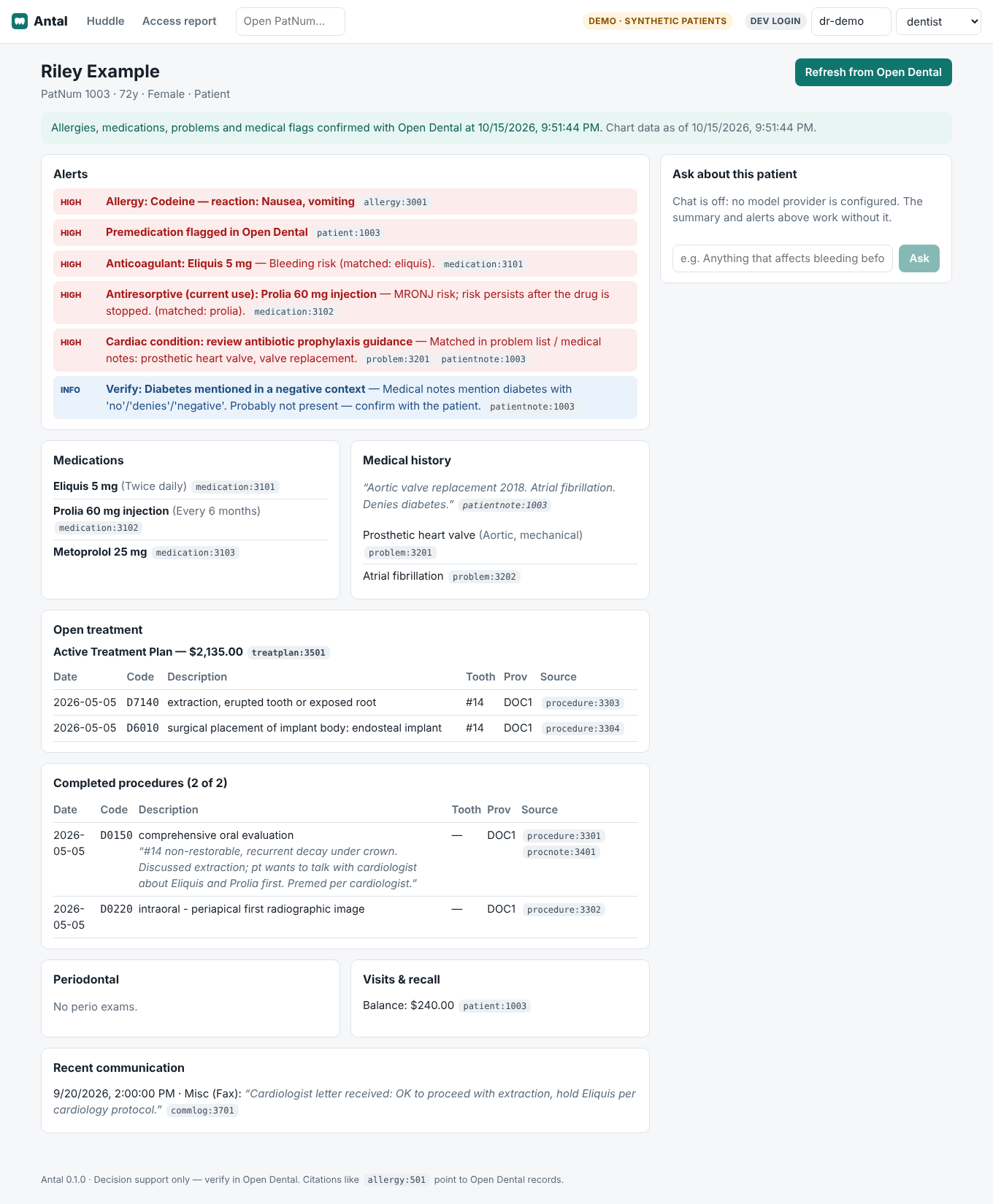
Ask in plain English about medications, medical history or treatment. The patient-scoped assistant uses chart records and returns citations, with checks that flag unsupported answers for review. Chat requires a configured model; this actual product screenshot shows it switched off.
Morning huddle
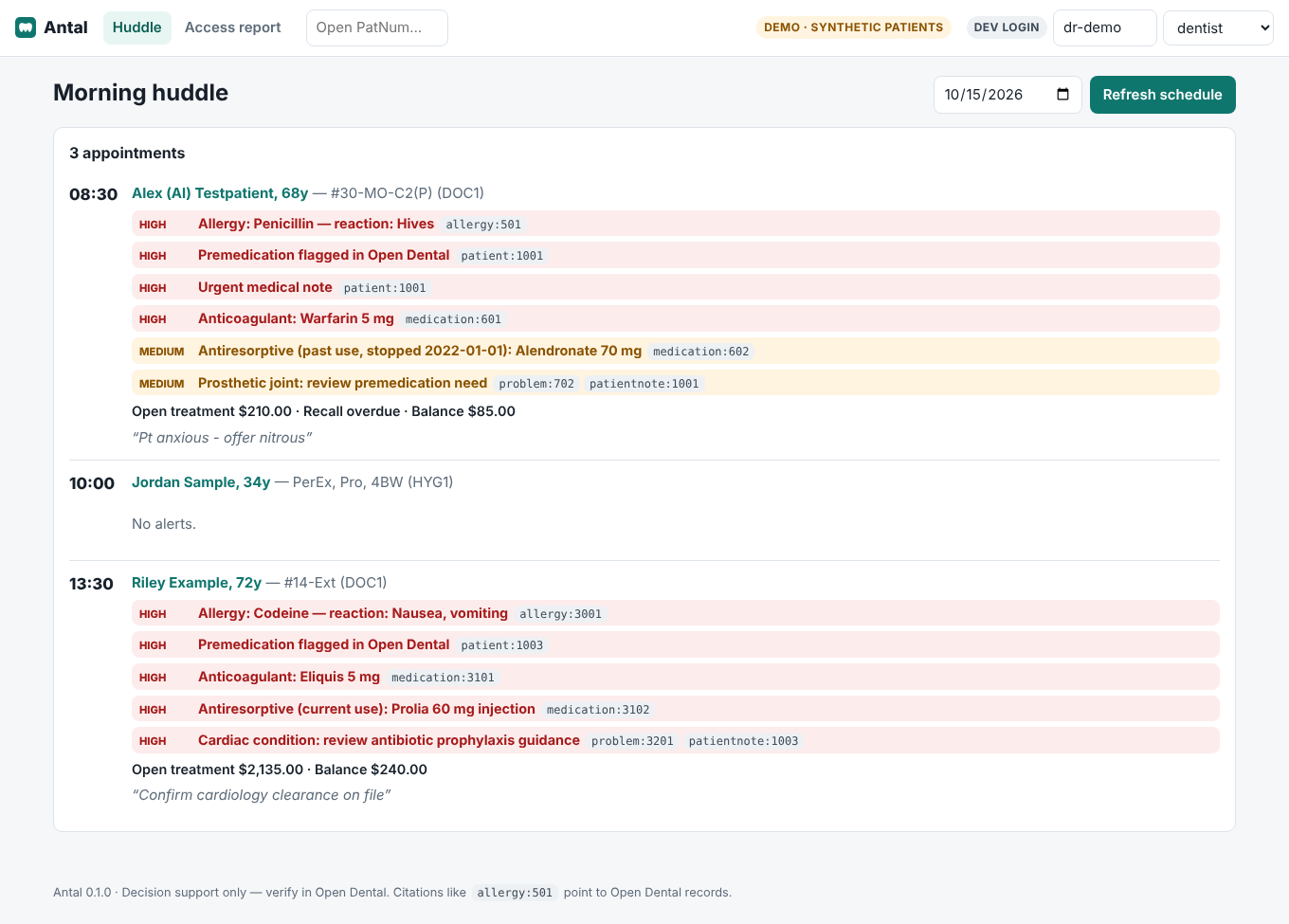
Review the day's patients, medical alerts and open treatment before the first appointment. See when safety information was last checked.
Patient brief
Bring medical context, medications, treatment and chart history into one patient brief. Ask chart questions when a model is configured; answers carry citations and review checks.
Supply inventory
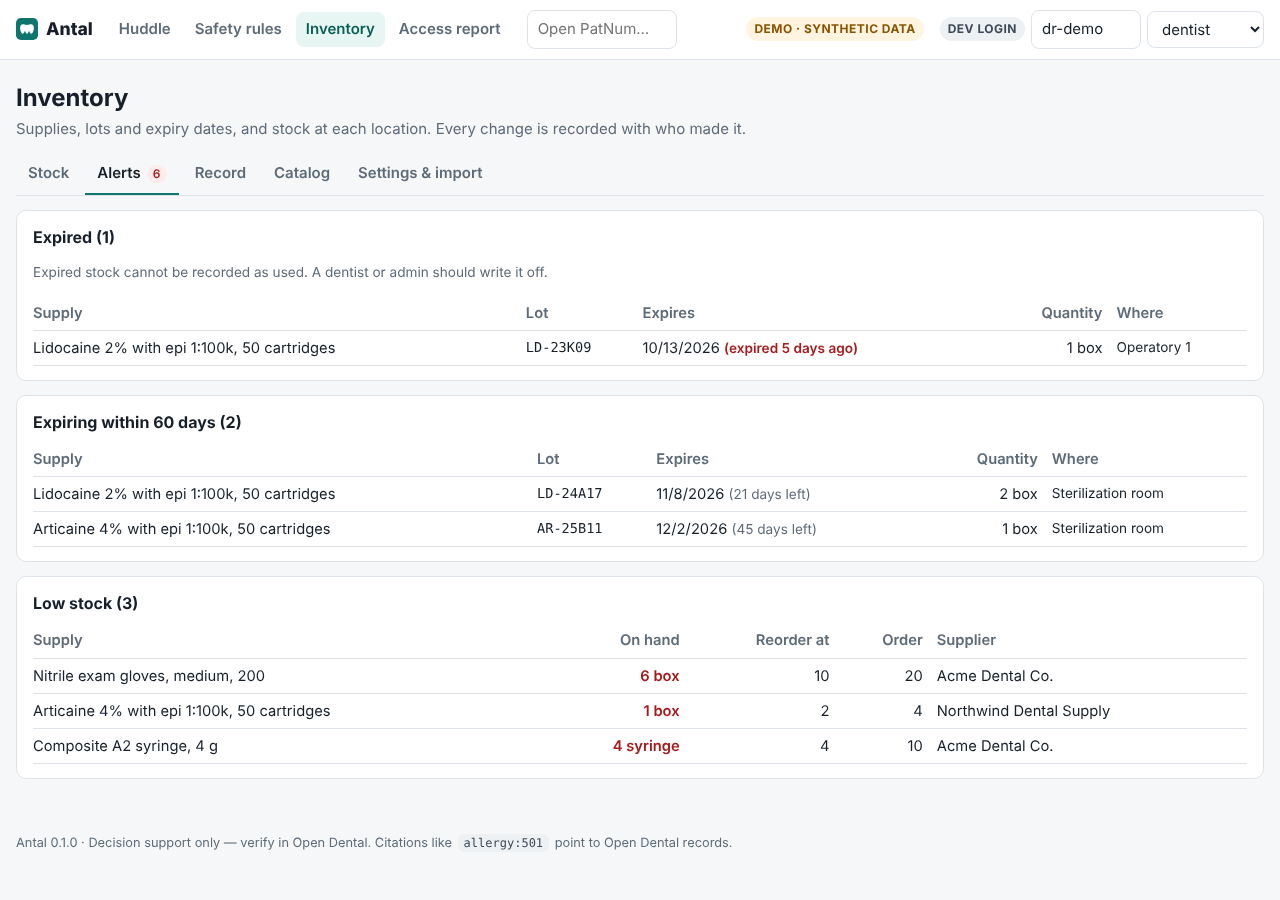
Review stock, lots and expiry dates by location. Bring expired, expiring and low-stock supplies into focus.
Security is part of the product
Antal is designed around limited access, traceable answers and practice-controlled data. It supports the dentist’s judgment; it does not diagnose or decide treatment.
Tools receive the patient scope from the server. The model cannot choose another patient by supplying an identifier.
The application and database run at the practice. Stored chart and conversation data are encrypted, with role-aware views and recorded access.
Answers carry chart-record references. Grounding checks look for unsupported dates and numbers and flag responses for review.
The demonstrated connection reads the chart; it does not write back to Open Dental.
Medical alerts are computed by code using the practice’s rules. Safety-critical chart data is re-checked when stale.
Real-patient chat requires the appropriate provider agreement, retention configuration, evaluation and practice security setup. These are prerequisites, not completed certifications.
Feature library
Explore the core assistant workflows and supplemental tools for the team. Demo means synthetic data; live practice validation is still ahead.
Ask about one patient's chart, with citations and answer checks.
Review medical context, medications and treatment with chart sources.
Bring date-based changes since the last completed appointment into view.
Start the day with the schedule, patient context and safety alerts together.
Let dentists and admins configure the practice's alert rules.
Track supplies by location, with lot, expiry and low-stock visibility.
See the day's appointments through a view built for front desk and billing.
Find a patient by last name or chart number from the header.
Review recorded chart access through an administrator view.
Give admins a practical view of connection and setup health.
Planned support for eligibility, frequency checks and claim preparation.
Planned clinical-note drafts for the dentist to review and approve.
Planned dictation and hands-free perio workflows.
Planned practice-wide views of treatment, recall and receivables.
Planned literature and guideline answers with citations and no patient data.
Try another term or reset the filters.
Current capabilities and future plans, clearly separated.
Supply inventory
See supplies at each location. Track lots and expiry dates. Review expired, expiring and low-stock alerts.
See quantities across rooms and operatories.
Keep lot numbers and expiry dates with each supply.
Find a supply by scanning its barcode.
See who recorded each stock change.
Import the supply list through a read-only connection.
Pilot approach
The starting point is an independent practice on Open Dental, with a team willing to help validate the workflow.
Clinical pilot A focuses on patient briefs and the huddle. Chart Q&A follows evaluation. Inventory is shown in the supplied demonstration; its pilot scope should be agreed separately.
Confirm Open Dental API access, an office computer, practice identity and the required privacy and security setup.
Explore the workflows with synthetic charts and supplies before any real patient data is involved.
Agree the pilot scope and evaluate usefulness, preparation effort and how the team uses the product.
A little more detail
Antal works alongside Open Dental. It reads practice data through the API and presents focused workflows for the team. The demonstrated Open Dental connection is read-only.
The capability has been built or demonstrated with synthetic data. It is not a claim of live practice deployment, clinical validation or general availability. The screenshots show synthetic patients and supplies.
Safety alerts are computed by deterministic rules. A practice's dentist or administrator can configure its rules. Chart Q&A uses a model when configured, with citation and grounding checks; it supports the dentist's judgment.
The application is designed to run in containers on a practice computer, with a local database and HTTPS. Chat adds an external model connection. Appropriate agreements and retention configuration must be in place before real patient data is used.
The site presents a synthetic demonstration. Pilot readiness includes checking Open Dental access, practice setup and the applicable privacy and security requirements. The first clinical pilot focuses on patient briefs and the morning huddle; chart Q&A follows evaluation.
The feature library distinguishes demonstrated capabilities from work in development and planned features. Insurance support, note drafting, voice, broader practice operations and research assistance are roadmap areas, rather than promises of present availability.
AI & clinical Demo
Ask about one patient's chart, with citations and answer checks.
When a model is configured, the patient-scoped assistant answers chart questions with cited records. Citation, grounding and review checks flag unsupported output. A model key, evaluation and appropriate privacy configuration are prerequisites for live use; the supplied screenshot shows chat unconfigured.
Built or demonstrated with synthetic data; live practice validation is pending.
AI & clinical Demo
Review medical context, medications and treatment with chart sources.
A patient-centered summary brings together safety alerts, medications, medical history, treatment and visits. Facts carry their chart sources; safety-critical data is re-checked when stale.
Built or demonstrated with synthetic data; live practice validation is pending.
AI & clinical Demo
Bring date-based changes since the last completed appointment into view.
Deterministic comparisons highlight relevant changes on the patient page, in the huddle and in the chart context. Safety changes use the practice's alert severity.
Built or demonstrated with synthetic data; live practice validation is pending.
AI & clinical Demo
Start the day with the schedule, patient context and safety alerts together.
Schedule-driven preparation brings the day's patient charts into a huddle. Safety information shows its freshness and can be re-checked. Open treatment and relevant patient context sit alongside the appointment.
Built or demonstrated with synthetic data; live practice validation is pending.
Administration Demo
Let dentists and admins configure the practice's alert rules.
Safety alerts come from deterministic code and the practice's configured rules. Authorized users can change severities, turn alerts off, adjust matching terms and reset defaults. Changes are audited. Review and sign-off are optional.
Built or demonstrated with synthetic data; live practice validation is pending.
Inventory Demo
Track supplies by location, with lot, expiry and low-stock visibility.
The supplied inventory demonstration shows stock by location, lots, expiry dates and expired, expiring and low-stock alerts. It also describes barcode lookup, recorded changes and read-only supply-list import. Expired stock cannot be recorded as used. This is Antal's own stock management, not write-back to Open Dental.
Built or demonstrated with synthetic data; live practice validation is pending.
Front desk Demo
See the day's appointments through a view built for front desk and billing.
A role-scoped schedule presents non-clinical appointment information, confirmation, arrival, balances and relevant reminders. The front-desk view does not expose the clinical chart. Billing can put balances first.
Built or demonstrated with synthetic data; live practice validation is pending.
AI & clinical Demo
Find a patient by last name or chart number from the header.
Clinical users can find and open a patient through a bounded, server-side search. Search terms are not stored in browser storage, logs or the audit trail.
Built or demonstrated with synthetic data; live practice validation is pending.
Administration Demo
Review recorded chart access through an administrator view.
An append-only, tamper-evident audit log supports access reporting. Sensitive identifiers are protected in new audit records. Production deployment still requires operational setup, backup and review.
Built or demonstrated with synthetic data; live practice validation is pending.
Administration Demo
Give admins a practical view of connection and setup health.
Deterministic status checks cover practice-system connection, morning preparation, sign-in, encryption, access logs, backups and chat configuration, without exposing patient data or secrets.
Built or demonstrated with synthetic data; live practice validation is pending.
Front desk Planned
Planned support for eligibility, frequency checks and claim preparation.
The roadmap includes deterministic frequency and eligibility checks, code suggestions subject to licensing, attachment checklists, narratives and appeal drafts. Staff remain responsible for submission. This is not part of the demonstrated product.
On the roadmap; not available in the demonstrated product.
AI & clinical Planned
Planned clinical-note drafts for the dentist to review and approve.
The roadmap proposes note drafting and human-approved write-back. The present Open Dental connection remains read-only; note write-back is not available in the demonstrated product.
On the roadmap; not available in the demonstrated product.
AI & clinical Planned
Planned dictation and hands-free perio workflows.
Voice dictation and perio charting are roadmap items. No present availability, delivery date or clinical performance is claimed.
On the roadmap; not available in the demonstrated product.
Front desk Planned
Planned practice-wide views of treatment, recall and receivables.
The roadmap includes unscheduled treatment, overdue recall and accounts receivable lists across the practice, with incremental synchronization. These broader operational workflows are planned.
On the roadmap; not available in the demonstrated product.
AI & clinical Planned
Planned literature and guideline answers with citations and no patient data.
A separate research scope is intended for evidence from literature and guidelines, without patient data. This is a roadmap capability rather than current availability.
On the roadmap; not available in the demonstrated product.


